Showing posts with label seo. Show all posts

How To Index Blogger Blog On Google

Whenever any one make blog or website, The first thing come into mind is how to get visitors on blog and how to show its contents in search results.You can get visitors on your blog by indexing your blog on search engines.Your blog will index by S.E when you submit your blog on them.But typically, you have to wait some time for the Googlebot to crawl your blog and add it to the Google index.


index-blogger-blog-on-google
           
So the question comes in our mind how do it quickly, here are the basics of how blog or website content is crawled and indexed and also some great ways to get the Googlebot to your website or blog to index your content sooner rather than later. I think first of all you should learn about term index, crawl and Googlebot. Just below here you can read about them.

What is Googlebot, Crawling, and Indexing?

Difference between these G.B crawling and indexing are given below.

  • The Googlebot is a software that Google sends to our blogs and websites to collect information about documents or contents on the web to add to Google’s searchable index.
  • The process of getting new information about any blog or website and send them back to Google, done by the googlebot this process is known as crawling. The Googlebot finds what to crawl using links.
  • When the G.b collect new info from web by their crawling activity then they show new contents or posts of blog in their search engine this process of showing posts in S.Results is indexing.
So how does the Search engine find new posts on your blog and index them in search results? It is done when we submit our blog and blog site map on S.E.

How To Submit Blog On Google Search Engine

                                     To add blog on Google search engine just follow the below steps.


  • First of all go to Google webmaster tool
  • Sing in here with your gmail account if you have no gmail account,make new one.


    google-webmaster-tool
    Sing in To Webmaster

  • Now click on Add property to add your blog or website.

                                                  
    submit-blog-on-google
    Click on ADD property
  • When you click on it new popup box will open just past url of your website or blog here and then click on continue.
    add-blog -url-in-google
    Add blog url
We have added our blog on Google Search engine.But you need to verify it so read the below paragraph to verify your property.

Verify Your Blog On Google

                                  This is most important step to index your blog on google search engine to do this step you need to follow the lines given below.


  • Go to Your blog dashboard by clicking on the url of your blog as shown in image.                                                       
    verify-blog-on-google
    Click on url of blog or website
  • Dashboard of your blog on webmaster will open, Just click on the gear button which is on the top right side of screen.

                                                                      
    submit-blog-on-google
    go to gear then on verification detail
  • Drop down menu will open go to verification detail and then click on Verify using a different method.
  • If your blog is on Blogger/Blogspot platform select HTML Tags .

                                                                      
    copy-meta-tags
    Copy meta tags
  • They will provide a meta tags just copy them and paste them just below to <head> tag of your blog template.And then save template.
                                                        
    paste tags below <head>
  • Now again go to webmaster and click on verify to complete verification process.

                                                                         
    submit-your-blog-to-index

  • Page will reload and you will see congratulation message.

                                                                    
    index-complete
Google will start indexing your blog's posts now but you need to submit your blog sitemap on google so the googlbot can crawl and index your blog's contents easily.

How To Submit Blogger Blog Site Map On Google

There are many platforms to start blogging and i can't wright about every platform to submit blog site map if you are using blogger/Blogspot hosting then well and good and keep following me to learn how to submit blog site map on G.Search Engine.

Blogger make sitemap for their blog's automatically so you don't need to make it you just have to submit it.

Steps To Submit Site Map

  • Go to Google webmaster.
  • Now Go to your blog dashboard on webmaster by clicking on it.
  • Click on Crawl and then on Sitemap.

    add-site-map
  • Then click on ADD/Test Sitemap.
                                                                           
    add/test-site-map
New box will open just type sitemap.xml in box then on Submit site map.
                                                                

Congratulation we Done !!!!.

Now google will start indexing your blog in search results and you will get valuable traffic from Google search engine.

How to Get Your New Blog Index Quickly

                                      When you done the all above steps, It will take some days to index blog by google in some case it may take several weak. So here below are some tricks and easy ways to index your blog on google search engine quickly.


  • Setup Your RSS with Feedburner – Feedburner is RSS management tool own by Google.Login and submit your blog’s URL or RSS feed URL into the “Burn a feed” field. In addition to this your sitemap will also notify Google about new posts on your blog so they will also index automatically.
  • Submit to Blog Directories – TopRank has a huge list of sites you can submit your RSS feed and blog too. This will help you to make back links. If you can't start with all them, at least start with Technorati because it is also top directorie. Once you have a good amount of content, also try Alltop.
  • Install Google Analytics –You should install G.Analytics on your blog to track your visitors location it will also help Google to index your Blog.
  • Create Social Profiles – Crawlers get to your site via links. One way to get some quick links is by creating social networking profiles for your new website or adding a link to your new website to pre-existing profiles.
  • Guest Posts – Again, to help in the back link building process, get some more links to your new website by submitting guest posts to blogs in your niche. Always write quality contents not Spamy spamy posts will damage your SEO.
Once your blog is index by google you will enjoy traffic on your blog from google search engine.
If you have any problem or want to suggest any thing about how to index blogger blog on google please comment below.

How To Set Up Blogger Setting Perfectly

Blogger Setting play important role to make our blog perfect and successful. You should set your blogger settings perfectly and also careful if you set your blogger settings wrong then it will kill your blog.Blogger setting also plays good role in SEO you want to improve your SEO then you should set your blogger setting in a good way. If you are new blogger and don't know how to set up blogger setting perfectly, then don't take tension, I will teach you these all things. We will not only learn how to set up blogger setting we will also discuss about their function and how they help us and how we should set up then So lets start.
                                set up blogger setting
First of all login to your blogger dashboard and click on SETTING option on left side.
                                
set up blogger setting

Next some more options will appear and from them select basic option.
                                                                
set up blogger setting
These basic settings are easy you can understand and set these your own.
Go to another option POSTS & COMMENTS and set the setting of the post and comment as shown in below image.

                                        
set up blogger setting

Next setting option is Language and Formatting and set these options according to your language,time zone and place.


Fourth and very important setting option is SEARCH PREFERENCES. The whole game of SEO and your blog traffic depend upon this you should set these blogger settings perfectly. Here are two important settings Meta tags & Crawlers and indexing.

Meta tags

Meta tags have been around since… Since I can remember. They have been a big part in search engine history. They were valued as a factor in rankings before – until people started abusing their use in getting on top of the SERPs. After that, Google opted meta tags out of the ranking factors. But that doesn’t mean they’re not important anymore. Meta tags still play quite a big role in your site’s SEO.


In the Meta Tag option there is box for blog description you must add your blog description because If you don't specify a search description for your blog, search engines will establish one for you based on your blog’s content.

Crawlers and indexing

In crawlers and indexing there are two features if you set these settings wrong, then Incorrect use of these features can result in your blog being ignored by search engines. so carefully set these as I say.
                       
crawlers and indexing


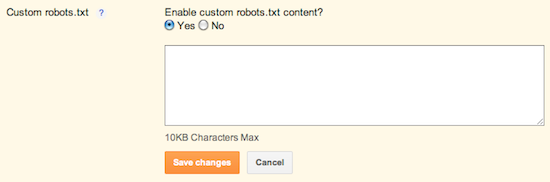
 Custom Robots .txt

Warning! Use with caution. Incorrect use of this feature can result in your blog being ignored by search engines.
Custom robots.txt is a way for you to instruct the search engine that you don’t want it to crawl certain pages of your blog (“crawl” means that crawlers, like Googlebot, go through your content, and index it so that other people can find it when they search for it). For example, let’s say there are parts of your blog that have information you would rather not promote, either for personal reasons or because it doesn’t represent the general theme of your blog -- this is where you can clarify these restrictions.
However, keep in mind that other sites may have linked to the pages that you’ve decided to restrict. Further, Google may index your page if we discover it by following a link from someone else's site. To display it in search results, Google will need to display a title of some kind and because we won't have access to any of your page content, we will rely on off-page content such as anchor text from other sites. (To truly block a URL from being indexed, you can use meta tags.)
Custom robot.txt for Blogger
Just add these codes in this box.
User-agent: Mediapartners-Google
Disallow:
User-agent: *
Disallow: /search
Allow: /
Sitemap: http://www.bloggerskilled.blogspot.com/sitemap.xml
Just change my blog url with your blog url.

Custom robots header tags

Custom robots header tags allow you to tell web crawlers not to index certain sections of your site. It’s similar to customrobots.txt, but not as granular. For example, if you check the box for "nofollow" under the "Homepage" section, it means that you don’t want web crawlers to consider any links on your homepage leading to any other page.
To enable these tags, go to Settings | Search Preferences, click Edit next to "Custom robots header tags," and select Yes.
The three sections you’ll see below correspond to:
  • Your blog’s home page
  • Your archive and search pages
  • Your posts and pages
Check the boxes to set the flags according to your preferences, then view the sections of your blog that you customized (home page, archive and search pages, pages and posts). You should see an X-Robots-Tag header tag in the HTTP response with the selected flags.Set these as shown in image below.
I think you have learned all these things which I tell above if you have any problem or want to ask any question our comment box is always open for you let me know in the comments what you learn from this post.

Keyword Difficulty Analysis:How To Choose Keywords For Seo


                                keyword difficulty analysis
You may have thought about the keywords for which you want your site to rank well in the search engines, but do you have any idea how difficult it will be to rank for those words? Their are many online tools to choose (find) perfect keyword to rank in search engines but the all are not for free today i am going to sharing a trick with you by following which you will learn how to choose keywords for seo and also how to rank your post in search result.
                                                                              
First of all you should know about keyword difficulty analysis so first learn some thing about keyword difficulty analysis.

What Is Keyword Difficulty Analysis

Keyword difficulty analysis means how it is difficult to get rank in search engines by using any keyword
Keyword Difficulty takes into account number of things like;
  • How many pages are currently ranking for a Particular Keyword?
  • How many pages are Bidding in that Keyword in Paid Search (PPC Campaign)?
  • How expensive are the clicks? and volume for that term in a month. 
I will give a example so you can understand it better EXAMPLE : if you’re trying to rank your post with  keyword like ‘Best Places For Visit In Pakistan’ then even with couple of internal links you’ll be able to rank your post with this keyword  highly personalized and local search.

But what will happen when you try to get rank by using this keyword "blogging" It will be very difficult, because most places will taken up by ecommerce sites and high authority blogs which have either reviewed or promoting ‘blogging.’

And what will happen when blog like mine and your use these keywords then search engine will show our blog post in 5th page or above.

Now don't worry about choosing good keyword for your post i will teach you all that about keyword difficulty analysis to get rank in search results.And your hard work will never lost if you work with interest.

I think you should also know what is strong result and weak result.
For example if we search search any thing on google and then if you find some popular websites or blogs on first page like Wikipedia, Wikihow, Mashable,e.t.c or any other popular website or blog then it will be very difficult to beat them and we cannot get rank in first page of search engines so we should choose any other keyword .This is called strong result.
                                     
keyword difficulty analysis


Now if we search any long tail keyword then we will find some video sharing websites , forums , and amateur/unprofessional blogs or websites on first page then it is very easy to beat them and make place on first page.and this is called weak result.
                                     
keyword difficulty analysis
Lets learn how to choose(find)  perfect keyword.

Choose(find) SEO Keyword To Get Rank

There are many ways to chose(find) keyword for seo and these keywords will help us to get rank in search results.Lets see how many ways to choose(find) keyword.
  1. Choose(find) Keyword For Free By using Google Search Engine.
  2. Choose(find) Keyword in Less Time By Using Paid Tools.
As i mention in first point we can find keyword for seo and test our keyword difficulty for free by using google search engines.

Choose(find) Keyword To Get Rank By Using Google Search Engine

Google is not only tool to search things on internet it is also a good tool to choose(find) keyword for bloggers and webmasters.Bloggers who have time can use this free tool to get rank in search results.Let us see how can we use Google as a Keyword Difficulty tool and analysis competition to rank for a keyword.

  • First Go to google spreadsheet and make five columns  fill them as Keyword, Total Results, Results with allinurl, Results with allintitle and lastly Results with allintext.                       

excel spreadsheet


  • Now go to search engine and search your keyword and note total search in total search result and note it in spreadsheet under "Total search".  
I am going to do research on "SEO FRIENDLY"
                                                       
keyword difficulty analysis
                                                            
  • Again search your keyword but this time add allinurl: before keyword and note total result under allinurl in spread sheet.


keyword difficulty analysis

  • Search your Keyword again  first add allintitle: before keyword and note it in spread sheet.
                            
                                      keyword difficulty analysis                      
  • Now just last time search again your keyword but this time add allintext: before your keyword and note it.


keyword difficulty analysis
                                                                                                
Are you Know why we search our keyword 3 time? and why we add three different text before our keyword? and what is function of these texts? Here below is answer
We are doing keyword research to choose(find) perfect keyword that help us to rank in search results.
Function of those text which we add before our keyword to choose (find) keyword are given below.
  1. allinurl – Displays all results with keyword appearing in URL.
  2. allintitle – Displays all results with keyword appearing in Title.
  3. allintext – Displays all results with keyword appearing inside the article.
Why we collect these data and what is their purpose.?
                               
                 
keyword difficulty analysis
  The keyword with than or nearly equal to 1000 000 total result have high chance to get rank in first page.
The the keyword with less than 1000 total search with allinurl and allintitle also have high chance to get rank in first page.
I’d suggest you to not try for a keyword which Results with "allintext" is 50% more than the ‘Total Results’.   
If you find a keyword which have all that thing which i tell above than you have very high chance to get rank in first page with 1500+ words in-depth blog post with proper images optimization, High  Reading Score, High loading speed, Best  Social Shares, Inter Linking and several high  Backlinks.     
If you have doubts regarding about this technique, Just leave a comment below so you will not forget it later

Choose(find) Keyword with Keyword Difficulty Checker

 To choose(find) keyword with these tools take less time but they are not free you need to pay them if you want to use these tools but don't worry i have found a tool to do keyword difficulty analysis for free.It is not free for all people it is only free for first 500 members so what are you waiting for go to Keyword Inspector.
It is a product of learn2rank.com to do keyword difficulty analysis.
When you sing up on keyword inspector then they will make password for your account and then i will be sent to your email.

When you sing up completely log in and follow these steps
  • Enter your keyword in the  box  and select the country.
  • Search results depend on your country you are targeting. Google  ranks ecommerce sites, blogs, and websites within or related to that country which you select.
  • Once you write your keyword click on Submit button and let Keyword Inspector do the work.
  • In the image below, Keyword Inspector shows that it is VERY DIFFICULT to rank for our chosen keyword, so we should leave this keyword and try any other.


Keyword Inspector keyword analysis tool
This tool show you different type of difficulty i will suggest you to select easy or less difficult keyword so you will rank easily.It also show keyword competition so you should choose a key word which competition is less than 45% so it will easy to rank.
It only show the competition and difficulty only in country which you select.
If you have any problem or doubt regarding this tool just leave replay below i am always ready to help you.

Find Keyword Difficulty With Paid Tools 

There are a large number of keyword difficulty tool to find keyword difficulty Let disqus some line about them.
Personaly i use both two tools which i tell above means Google and  Keyword Inspector.If you have no time like moms,dads always have less time so you can use any one of these online tools to find keyword difficulty. 
The tool about  which i am talking is professional SEO tool for digital marketers called as SEMrush.
The next tool is tool of moz.com you can find it on google.

Final Words 

These was the tools to find keyword difficulty to rank your blog post if you like or have any problem don't forget to share your idea and feedback with us.